SEO
What Is ASO? How to Do App Store Optimization? (2026)
What is ASO, how does it work, and what does it take to rank higher on the App Store and Google Play in 2026? Everything you need to know, in one place.

Millions of new apps are added to the App Store and Google Play every year. Standing out in that crowd is no longer just about building a great product. Your app needs to be visible to the right people, at the right time. App Store Optimization (ASO) is exactly what makes that happen.
What Is ASO and Why Does It Matter?
ASO (App Store Optimization) is the process of improving your app's visibility in the app stores and driving more organic downloads. Everything from your title and icon to user reviews and screenshots is part of this process.
Think of it this way: if SEO gets websites to the top of Google, ASO gets apps to the top of the App Store and Google Play.
Why does it matter so much? Because 65% of users discover new apps through direct store searches, an audience paid ads simply can't reach. On top of that, organic users consistently show higher retention rates compared to those acquired through paid channels.
What's the Difference Between App Store and Google Play Algorithms?
Both platforms use different signals to rank apps, and applying the same strategy to both is a mistake.
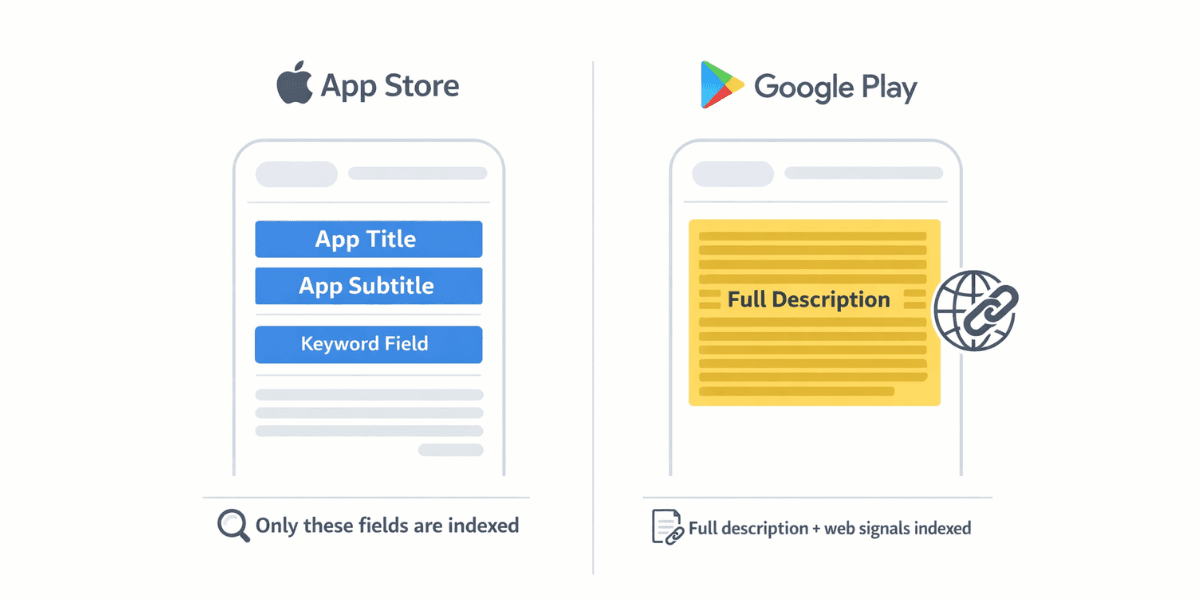
On the App Store, keywords can only be placed in specific fields like the title, subtitle, and a 100-character keyword field. Words outside these areas don't influence the algorithm. Google Play takes a much broader approach and indexes the entire description text. So while a long description barely moves the needle on the App Store, it directly impacts rankings on Google Play.
Google Play is also influenced by web SEO. Backlinks pointing to your app and your overall web presence can indirectly affect your store ranking. The App Store has no such dynamic.
What Are the Core Components of ASO?
ASO isn't a single setting you tweak once. It's made up of multiple interconnected components that all work together.
How Should You Optimize Your Title?
The app title is the strongest ranking signal in ASO. It should carry both your brand name and your target keyword. For example, instead of just "Visby", a title like "Visby: AI Visibility & GEO Tasks" carries significantly more ranking value.
The App Store limits titles to 30 characters, so every character counts. Prioritize the keyword with the highest search volume that's most relevant to your app.
Google Play also has a 30-character title limit, but the short description (80 characters) offers an additional strong indexing field. Use both in a way that complements each other.
One of the most common mistakes is stuffing multiple keywords into the title. It looks unreadable and can get flagged by store policies.
How Should Your Icon, Screenshots, and Preview Video Look?
When a user sees your app in search results, the first things they notice are the icon and the first screenshot. No matter how well your title is optimized, if the visuals don't earn the tap, the ranking means nothing.
For the icon, one principle applies: it needs to be recognizable even at small sizes. Complex illustrations turn into meaningless blobs when scaled down to icon dimensions. Study competitor icons, then aim for something distinct but still recognizable within your category.
Screenshots should tell a story. The first three especially need to communicate what the app does and why it should be downloaded within seconds. Adding a short caption to each screenshot sharpens the message. Whether to go vertical or horizontal depends on your target audience's habits and what competitor analysis shows.
A preview video (up to 30 seconds on the App Store, up to 2 minutes on Google Play) can significantly boost conversion rate when done right. But a long and generic video can actually perform worse than having no video at all. The first 3 seconds are decisive; if the user doesn't see value immediately, they move on.
Do User Ratings and Reviews Affect ASO?
Yes, both directly and indirectly. Both platforms tend to surface higher-rated apps. The App Store explicitly uses rating as a ranking signal. Google Play leans more on engagement and retention data, but a low rating still pulls you back there too.
User reviews carry a different dimension as well. The words inside them influence the algorithm. What keywords are users using to describe your app in their reviews? Those words get organically indexed.
The most effective way to increase review volume is timing. The best moment to ask a user for a review is right after a success, finishing a task, completing a level, or reaching a milestone. Asking during a frustrating moment not only reduces your chances of getting a review but also increases the risk of negative feedback.
Responding to negative reviews regularly and with a solution-focused tone retains existing users and builds trust with potential ones.
How to Do Keyword Research?
Keyword research is the most time-consuming but most critical step in ASO. If you're targeting the wrong keywords, no amount of optimization will get you in front of the right audience.
The starting point is usually competitor analysis. Seeing which keywords the top apps in your category rank for both shapes your target list and surfaces gaps that aren't yet crowded.
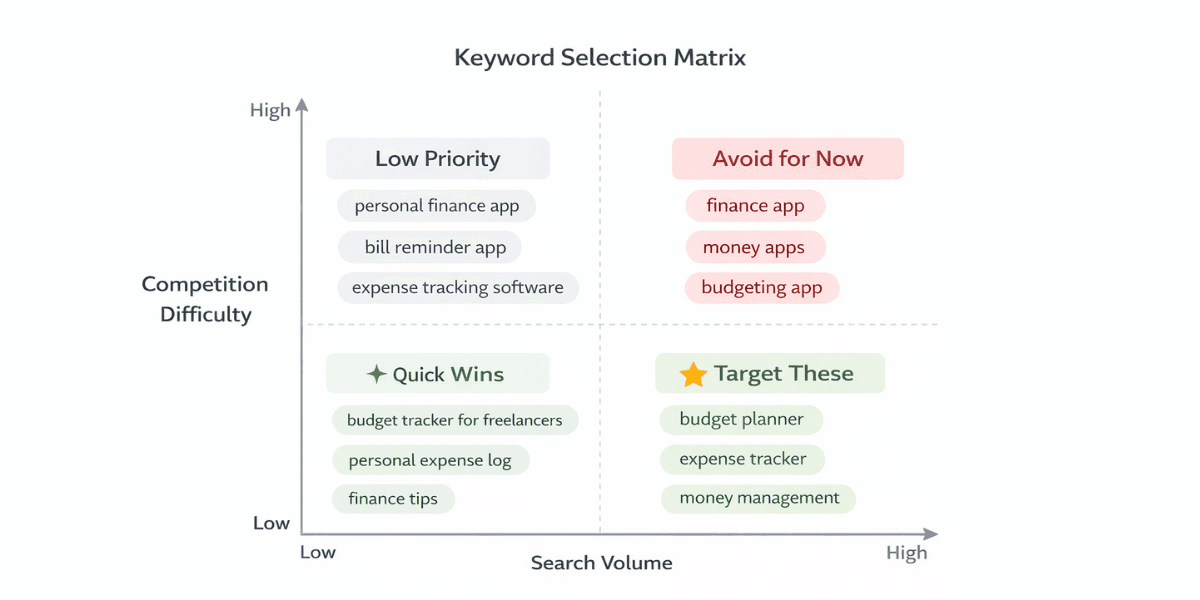
Search volume shouldn't be the only criterion for keyword selection. High-volume keywords come with high competition. Mid-volume but more specific long-tail keywords offer much more realistic targets for small and mid-sized apps. Think "budget tracker for freelancers" rather than "budget app".
Commonly used tools for keyword research include AppTweak (strong for keyword suggestions and competitor analysis), Sensor Tower (market data and category trends), AppFollow (competitor review analysis and keyword tracking), and MobileAction (especially useful for Apple Search Ads integration).
Before adding any keyword to your list, ask three questions. Is anyone actually searching for this? Can I realistically rank for it? What will a user who finds me through this keyword do with my app?
How to Do Visual Optimization and A/B Testing?
Visual optimization isn't just about looking good. Every visual decision has a measurable impact on conversion rate.
Why Do the First 3 Screenshots Matter So Much?
Users scrolling through search results rarely stop to swipe through your listing. On the App Store, the first 2-3 screenshots are already visible as a preview. If you don't communicate your app's value proposition clearly in that small space, the user moves on without ever visiting your page.
The first screenshot should answer "what does it do?". The second should answer "why this one?". The third should answer "is this for me?". Breaking that order hurts conversion.
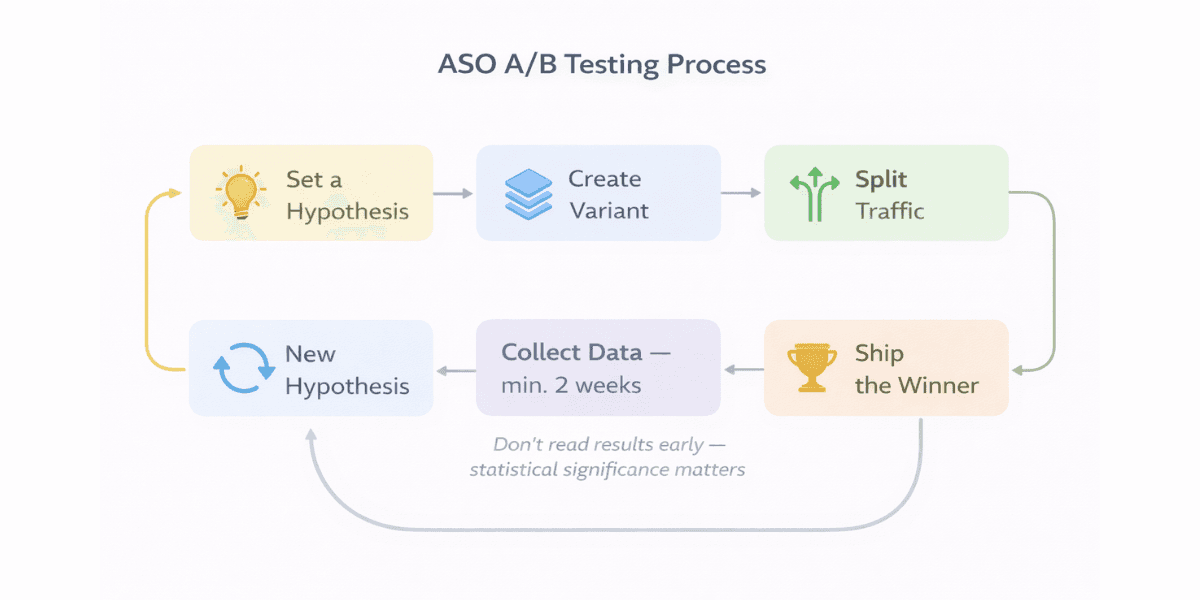
This is where A/B testing comes in. Through App Store Connect's Product Page Optimization (PPO) tool, you can test different screenshot sets, icons, and preview videos directly. Google Play's Store Listing Experiments serves the same purpose.
A few practical points for the testing process: test one variable at a time. If you're changing the icon, don't change the screenshots at the same time. Wait at least 2 weeks for results since early readings can be misleading. And always form a hypothesis first, something like "a dark background will drive higher tap-through because the category average skews light".
How to Measure ASO Performance?
ASO isn't something you set up once and forget. Without regular measurement, you can't tell what's working and what isn't.
Which Metrics Should You Track?
Impression is how many times your app appeared in the store. If this number is growing, your keyword optimization is working.
Conversion Rate (CVR) tells you how many people who visited your page actually downloaded the app. If this is low, the problem is in your visuals or description, not your keywords.
Keyword Ranking shows where you stand for your target keywords and which ones are climbing or dropping.
Rating and Review Velocity is the number of ratings and reviews received within a given period. This metric affects both the algorithm and user trust.
Retention (Day 1 / Day 7 / Day 30) isn't a direct ASO metric, but low retention indirectly hurts your store ranking. Platforms don't promote apps that users download and immediately delete.
App Store Connect and Google Play Console's own analytics panels are a solid starting point for tracking all of this. For deeper analysis, tools like AppTweak or Sensor Tower also offer competitor benchmarking.
ASO Trends in 2026 and Common Mistakes
AI-powered tools are everywhere but they're not creating differentiation anymore. Almost every ASO tool now offers AI-driven keyword suggestions and description writing. These tools speed things up, but the outputs are starting to look identical. If you want to truly stand out from competitors, use the tools as a data source rather than copying their output as-is.
Google Play's ranking signals have shifted. In late 2025, Google began weighting app quality scores (crashes, ANR rates, user churn) more heavily in rankings. Technical performance now affects visibility directly, not just user experience.
Apple Search Ads and organic ASO are more integrated than ever. Seeing which keywords convert in Search Ads is a powerful data source for shaping your organic keyword strategy. Managing the two in separate silos no longer makes sense.
Common mistakes worth avoiding:
Keyword stuffing is still happening. Cramming keywords into your title and description hurts the reading experience and violates both platforms' policies. It won't boost rankings in the short term and creates penalty risk in the long run.
Visuals get uploaded once and forgotten. Meanwhile competitors are updating their screenshots and running A/B tests. Staying static means falling behind gradually.
Focusing only on one language is one of the most common growth blockers. Expecting global growth without localization is wishful thinking. Even in a small market, proper localization can drive a meaningful spike in organic downloads.
ASO results take time. Keyword changes can take 7 to 14 days to reflect in rankings on the App Store and 3 to 7 days on Google Play. Making frequent changes out of impatience makes it nearly impossible to understand what's actually working.
Follow Social Media
Follow us and don’t miss any chance!